
TL;DR
A strong LinkedIn or work profile picture should be current, clear, well-lit, and matched to the person's professional goal. The safest choice is usually a head-and-shoulders image with natural expression, simple clothing, and a clean background; AI headshots can help when they preserve likeness and avoid over-polished edits.
Profile pic pictures for linkedin and work profiles now act like a digital first handshake across recruiting, sales, remote work, and personal branding. A hiring manager, client, podcast guest booker, or dating app match often sees the image before reading a single line of context.
Work profile picture: a current, face-forward image used to represent a person in a professional setting, including LinkedIn, Slack, Zoom, company directories, speaker pages, resumes, and portfolio websites.
For people without studio photos, Looktara can help create resume-ready and LinkedIn-ready headshot options from existing images. The best result still depends on clear source photos, realistic styling, and a picture that matches the role rather than a generic corporate look.
Table of Contents
What kind of profile picture should be used for LinkedIn and work profiles?
A LinkedIn or work profile picture should show a clear, current, approachable view of the person's face with professional lighting, a simple background, and styling that fits the target role. The strongest images feel credible first and polished second, because trust matters more than glamour on career platforms.
Key insight: the best professional photo looks like the person on a normal workday, only better lit, better framed, and less distracting.
A good work profile photo does four jobs at once. It confirms identity, signals role fit, creates warmth, and stays legible at small sizes on mobile screens. That means a sharp head-and-shoulders crop usually works better than a full-body pose or a distant lifestyle shot.
Quick standards for a credible work image
- Use a recent photo: a current appearance avoids awkward first meetings and interview mismatches.
- Keep the face dominant: eyes, expression, and facial detail should remain easy to see in a small circle crop.
- Choose neutral lighting: soft daylight or balanced studio light usually beats harsh shadows.
- Match the platform: LinkedIn, company bios, Zoom, and resume profiles can share a similar image, but not every social photo belongs on work profiles.
- Avoid heavy filters: over-smoothed skin, warped features, and fantasy backgrounds reduce trust.
A strong profile image can also support broader business branding. Founders and creators often pair a headshot with visual assets such as a LinkedIn post image generator or a consistent website banner so the same identity carries across channels.
Profile photo anatomy: crop, expression, wardrobe, and background
A high-performing work profile picture is built from five visible choices: framing, facial expression, lighting, clothing, and background. Each choice should make the person easier to recognize and easier to trust.
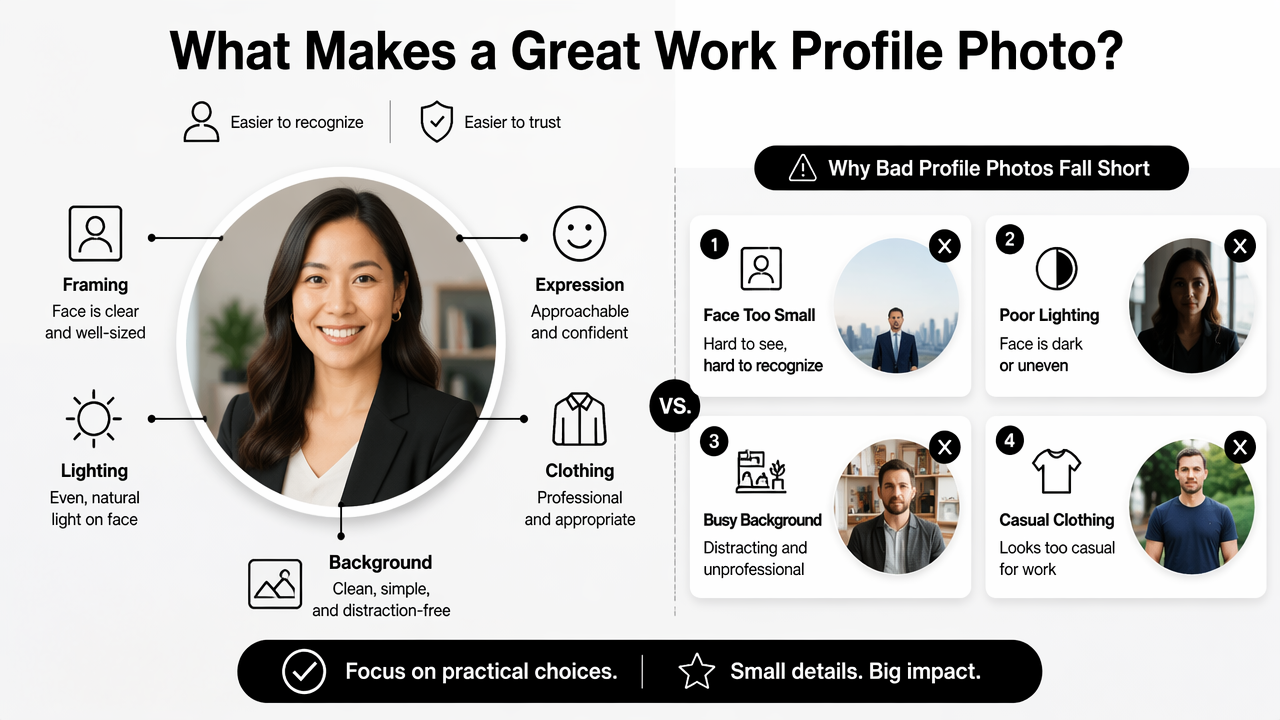
Bad profile photos usually fail for practical reasons, not artistic ones. The face is too small, the image is blurry, the background competes for attention, or the expression feels stiff. Small fixes often improve the photo more than expensive equipment.
Work profile picture checklist
| Element | Best practice | Avoid |
|---|---|---|
| Crop | Head and shoulders, centered face, enough space for circular cropping | Full-body shots, cropped-off hair or chin |
| Expression | Natural smile or calm confident look | Forced grin, blank stare, exaggerated pose |
| Lighting | Soft daylight from the front or side | Backlighting, harsh overhead light, strong shadows |
| Wardrobe | Role-appropriate solid colors and clean lines | Busy patterns, logos, wrinkled clothing |
| Background | Plain wall, office, outdoor blur, or brand-consistent setting | Cars, bedrooms, clutter, event crowds |
| Retouching | Light correction for brightness and blemishes | Plastic skin, changed face shape, fake eye color |
Professional does not always mean formal. A software engineer may look credible in a fitted sweater, a fitness founder may choose activewear in a clean studio, and a consultant may benefit from a blazer. The image should answer one question quickly: does this person seem like a fit for the work being offered?
Digital design versus print design use cases
Digital design needs legibility at tiny sizes, while print design needs high resolution and clean edges. LinkedIn, Slack, company intranets, creator pages, and hiring platforms compress images, so contrast and face clarity matter most. Conference badges, speaker sheets, and business cards need larger files with less aggressive cropping.
Competitor pages from Canva often group this topic under digital design, print design, images and photos, videos and audio, product, Canva AI, All Canva AI, plans, Canva for business, and All Canva for business. That structure is useful for templates, but a career photo needs a more personal decision: which image makes the person appear capable, current, and easy to contact?
Role-specific profile picture examples for 2026
The right work profile picture changes by role, seniority, and audience, because a recruiter, buyer, client, or collaborator reads visual signals differently. A finance executive and a freelance videographer can both look professional without using the same style.
Career professionals should avoid copying one generic LinkedIn look. Profile photos are part of positioning. The best image supports the message already present in the headline, work history, portfolio, and content.
Image style by professional goal
| Profile owner | Strong picture style | Why it works |
|---|---|---|
| Job seeker | Clean headshot, direct eye contact, simple top | Reduces friction for recruiters and hiring teams |
| Executive | Polished lighting, structured clothing, calm expression | Signals judgment, steadiness, and authority |
| Founder | Warm expression, branded background or workspace | Connects personal credibility to business identity |
| Freelancer | Approachable image with craft-related context | Shows both skill and availability |
| Creator or influencer | High-quality portrait with recognizable personal style | Balances professionalism with memorability |
| Remote worker | Bright, friendly headshot with uncluttered background | Works across Slack, Zoom, and company directories |
| Dating app user | Natural, attractive, realistic photo without corporate stiffness | Feels authentic while still showing care |
A job seeker using the same photo across a resume, LinkedIn, and portfolio creates recognition. For a stronger application package, a profile image can sit beside a tailored resume header, a portfolio homepage, and consistent social graphics. A personal site can also benefit from a website hero image generator when a founder or freelancer wants a sharper brand presence.
Business owners need slightly different image rules. The headshot should support the company's promise. A wellness coach, Shopify merchant, and B2B consultant may all need different colors, backgrounds, and expressions. Brand visuals such as a logo generator for Shopify brands can help keep the profile photo from feeling disconnected from the rest of the business.
AI-generated and edited profile photos: what is safe to use?
AI-generated profile photos are safest when they improve lighting, backgrounds, and styling without changing identity, facial structure, age, or body shape. A professional image should make recognition easier, not create a different person.
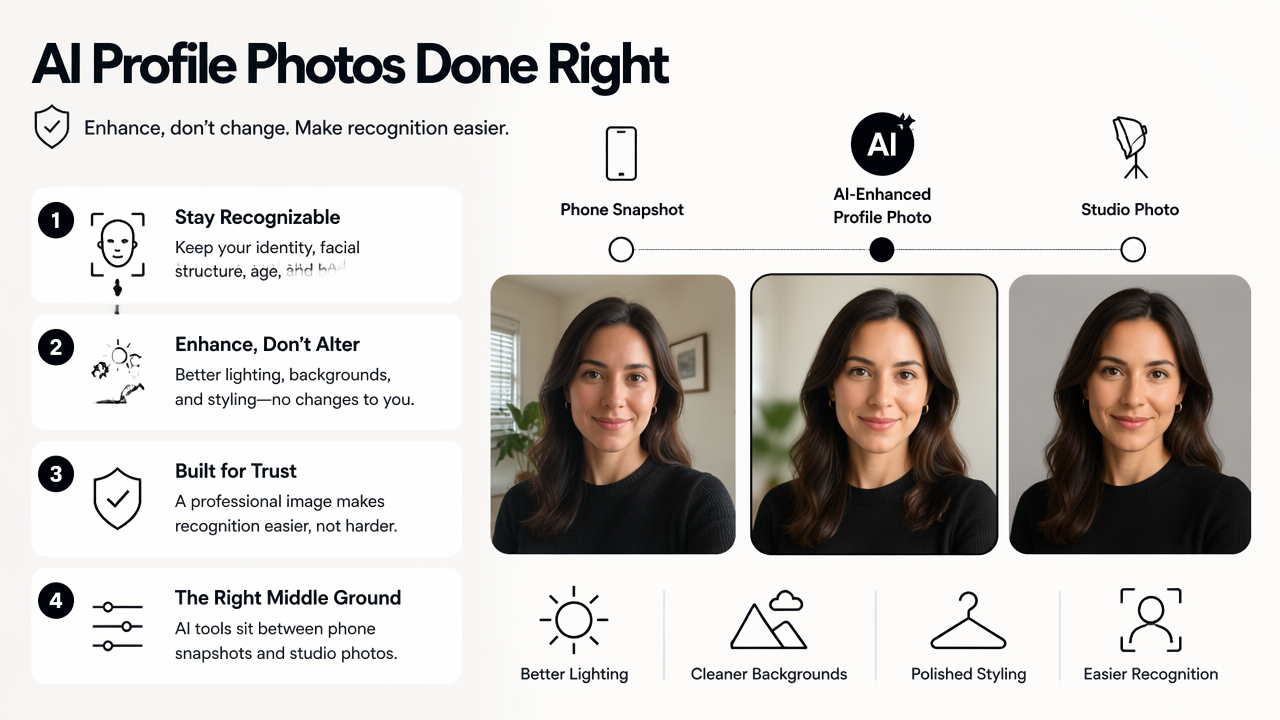
AI photo tools now sit between phone snapshots and studio photography. They can help people who lack time, budget, or access to a photographer. Still, authenticity matters because work platforms depend on trust. A photo that looks too synthetic may perform worse than a simple, honest portrait.
AI headshot options compared
| Option | Best for | Watch point |
|---|---|---|
| Looktara | Career-friendly headshots and branded profile visuals | Source photos should clearly show the real person |
| Canva AI | Quick templates and design layouts | Template polish can feel generic if overused |
| Traditional photographer | Premium executive portraits and controlled lighting | Higher cost and scheduling time |
| Phone photo with editing | Fast updates and casual professional use | Lighting and background quality vary |
Research on online environments supports caution around identity signals. A 2023 review of open-source intelligence by Yadav, Kumar, and Singh examined how public online data can be collected and analyzed in security contexts, which makes accurate identity presentation more important for public professional profiles source. A 2023 study on deepfake models and tools by Mukta, Ahmad, and Raiaan reviewed the effectiveness of synthetic media methods, underscoring why realistic but honest edits matter source.
Safe AI photo rules
- Keep the face recognizable: the image should pass a real-world meeting test.
- Use natural skin texture: polished does not mean waxy.
- Avoid false credentials: no fake office, uniform, lab, courtroom, or luxury setting.
- Check hands, teeth, glasses, and hair: small distortions make AI edits obvious.
- Match career context: a startup founder and a hospital administrator need different visual tones.
Looktara fits best when a person needs several professional image options without a studio session. The Looktara platform can also support related brand needs, such as creator thumbnails or professional cover visuals, after the main headshot style is established.
FAQ and next steps for better work profile pictures
Better profile pic pictures for linkedin and work profiles come from choosing one clear goal, selecting a realistic image style, and updating every professional platform consistently. A single strong headshot should support the person's next career move, not merely fill an empty circle.
Online work now blends identity, hiring, collaboration, and reputation. Research by Van Quaquebeke, Salem, and van Dijke on online organizational research discussed data quality and digital participation in professional study contexts, showing how seriously online presentation is now treated in work settings source.
Practical update sequence
- Pick the main audience: recruiter, client, buyer, employer, or community.
- Choose a photo style from the role table above.
- Prepare three to five candidate images.
- Test each image as a small circular crop.
- Update LinkedIn, resume, portfolio, Slack, Zoom, and email accounts in the same week.
- Refresh the image after a major role change, rebrand, or visible appearance change.
Creators and entrepreneurs can extend the same visual identity into content. A headshot can match a podcast cover image, a launch graphic, or a Pinterest pin for brand discovery so the person remains recognizable across search, social, and media placements.
What is the best background for a LinkedIn photo?
The best LinkedIn photo background is simple, clean, and relevant to the person's field. A plain wall, softly blurred office, tidy studio, or subtle outdoor setting usually works well. Busy rooms, event crowds, and car interiors distract from the face and make the image feel less intentional.
Should a work profile picture be formal or casual?
A work profile picture should match the professional audience rather than follow one fixed dress code. Corporate leadership, legal, finance, and consulting often benefit from more structured clothing. Creative, fitness, startup, and freelance roles can use a more relaxed look as long as the image stays clear, current, and intentional.
Are AI LinkedIn headshots acceptable in 2026?
AI LinkedIn headshots are acceptable when they preserve identity and create a realistic professional image. The safest AI edits improve lighting, background, and clothing style without changing facial features. A synthetic image that misrepresents age, body shape, workplace, or credentials creates avoidable trust problems.
How often should professional profile photos be updated?
Professional profile photos should be updated when appearance, role, industry positioning, or brand style changes. Many people refresh work images every one to two years, but a new job search, business launch, speaker opportunity, or major rebrand can make an earlier update worthwhile.
Can the same photo be used for LinkedIn, resumes, and company profiles?
The same photo can work across LinkedIn, resumes, company directories, and portfolio pages if the crop is flexible and the image feels professional. A consistent image helps recognition. Some platforms may need different dimensions, so keeping a square version, circular preview, and high-resolution original is useful.
Conclusion
A strong professional profile picture is not about looking perfect; it is about looking recognizable, capable, and appropriate for the next opportunity. The best next step is to gather a few current images, check them against the crop, lighting, wardrobe, and authenticity standards above, then choose the one that fits the target audience best.
For people who need polished options quickly, Looktara can help create work-ready headshot variations while keeping the final choice grounded in real identity. Visit looktara.com, prepare clear source photos, and build a profile image set that works across LinkedIn, resumes, company pages, and professional content.
Generated by EarlySEO.com