
TL;DR
AI LinkedIn photo generators work best when they improve lighting, background, crop, and polish without changing identity. Profile owners should choose realistic attire, a clean background, and a face-forward crop, then review the final image for accuracy before posting.
A LinkedIn photo is often the first trust signal before a recruiter, client, investor, or collaborator reads a profile. An artificial intelligence photo generator for linkedin photos can turn everyday images into polished headshots faster than a studio session, but the best results still depend on realistic inputs and restrained editing. Looktara is built for people who need professional visuals without turning personal branding into a design project. AI photo generator: software that uses artificial intelligence to create or enhance profile images from prompts, uploaded photos, or both.
Table of Contents
What is an artificial intelligence photo generator for LinkedIn photos?
An artificial intelligence photo generator for LinkedIn photos is a tool that creates or edits a professional-looking profile image using AI models trained to understand faces, lighting, clothing, backgrounds, and composition. The goal is not fantasy art. The goal is a credible headshot that still looks like the profile owner.
Artificial intelligence means computational systems performing tasks linked with human intelligence, such as perception, reasoning, and decision-making. AI visual tools fall under the wider category of AI art, where software generates or enhances images through models such as text-to-image systems.
Research on generative tools has expanded quickly. Rudolph, Tan, and Tan covered the rise of major chatbot systems in a 2023 higher education study, showing how fast public AI tools entered mainstream work habits in the Journal of Applied Learning & Teaching. For photos, the same shift appears in career branding: faster drafts, easier iteration, and lower production friction.
Key insight: the best AI LinkedIn headshot looks professionally prepared, not artificially perfect.
Core terms for AI profile photos
- Generative AI: software that creates new content, including images, from data patterns.
- Headshot: a portrait focused on the face and upper shoulders, usually used for professional identity.
- LinkedIn-ready image: a clear, realistic, front-facing photo that fits LinkedIn's circular crop and professional context.
- Retouching: light improvement to exposure, background, framing, or minor distractions.
- Misrepresentation: editing that changes age, facial structure, body shape, credentials, uniform, or setting in a misleading way.
How to create a LinkedIn-ready AI headshot
Creating a LinkedIn-ready AI headshot takes a current source photo, realistic styling choices, careful generation, and a final authenticity check. A strong workflow is: upload clear inputs, select professional attire, choose a simple background, generate several versions, reject distorted images, and export a square crop that works at small sizes.
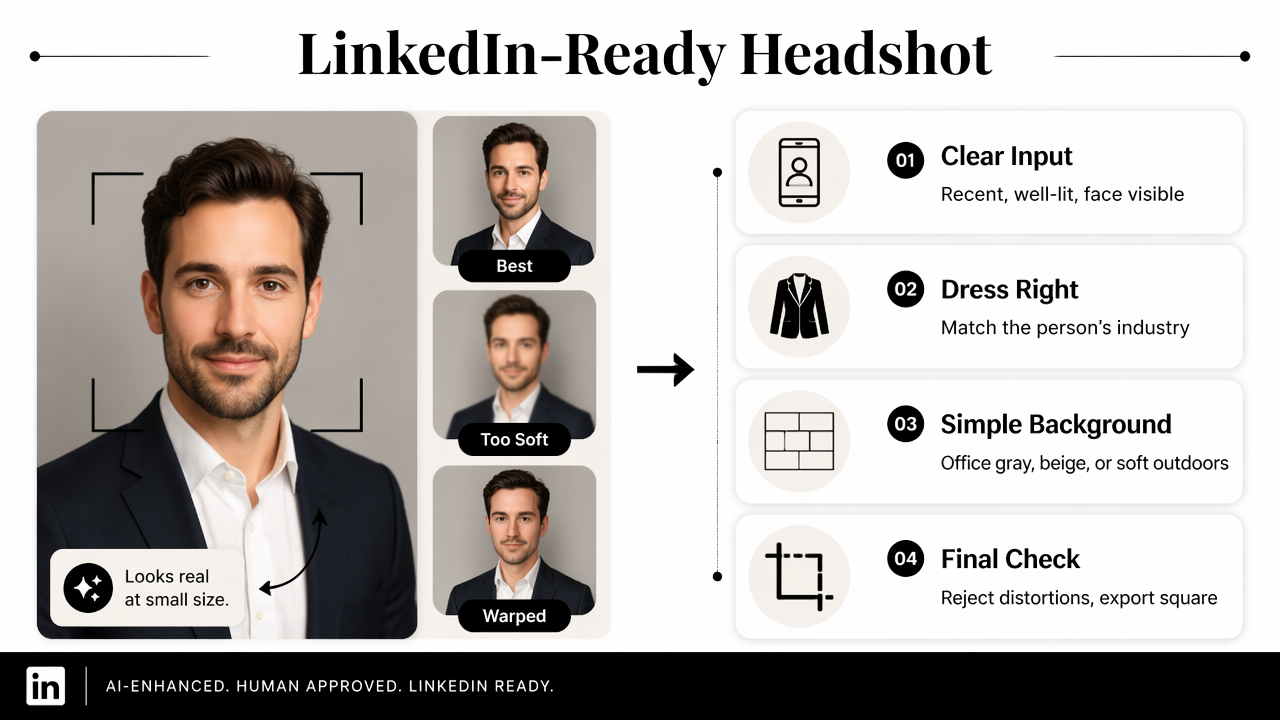
- Start with recent, well-lit selfies or portraits where the face is visible.
- Choose attire that matches the person's industry, not a costume version of it.
- Pick a neutral background, such as office gray, warm studio beige, or soft outdoor blur.
- Generate multiple options, since one output rarely captures the best expression and crop.
- Inspect facial features, teeth, hands, glasses, hairline, and skin texture.
- Export a square image with room around the head for LinkedIn's circular crop.
The Looktara platform fits this workflow when the goal is quick visual polish across a professional brand. A founder updating a profile photo may also need matching visual assets, such as an AI website hero image for a fitness Shopify brand or an AI pitch deck slide for a fitness Shopify business. Consistent visuals make the headshot feel like part of a larger public identity, rather than a one-off edit.
A practical review step matters because AI image systems can produce small errors that only appear after zooming in. Cheng, Varshney, and Liu discussed responsible AI algorithm challenges in the Journal of Artificial Intelligence Research, including the need to think beyond raw technical performance in their 2021 paper. For career imagery, responsible use means accuracy, consent, and context.
What makes an AI LinkedIn photo look professional?
A professional AI LinkedIn photo looks credible because the face is recognizable, the expression is approachable, the crop is clean, and the styling matches the person's role. The safest image usually has soft lighting, natural skin texture, simple clothing, and a background that does not compete with the face.
LinkedIn photos appear small in feeds, search results, comments, connection requests, and messaging. Fine details matter less than clarity, contrast, and facial recognition. A sharp image with a calm expression often beats a dramatic image with heavy effects.
LinkedIn photo choices by audience
| Audience | Best visual direction | Avoid |
|---|---|---|
| Job seekers | Clean background, business-casual attire, direct eye contact | Overly glamorous retouching |
| Executives | Formal wardrobe, controlled lighting, calm expression | Trendy filters or busy offices |
| Founders | Confident expression, modern neutral setting | Fake boardrooms or luxury props |
| Consultants | Trustworthy crop, polished clothing, warm lighting | Hard shadows or stiff poses |
| Remote workers | Clear face, simple home-office feel, tidy background | Casual snapshots with distractions |
| Creators | Personality-forward style with professional framing | Editing that hides the real face |
| Dating app users | Natural smile, relaxed lighting, authentic setting | Corporate stiffness or heavy smoothing |
For creators and entrepreneurs, the profile photo often sits beside other branded assets. A social creator might pair a headshot with an AI TikTok cover for a fitness Shopify campaign, while a video-first founder may need an AI YouTube thumbnail for a fitness Shopify channel. The photo should still look human first and branded second.
A simple test helps: if the image still looks clear at thumbnail size and still resembles the person in real life, it is probably strong enough for LinkedIn.
What should stay authentic in AI LinkedIn photos?
AI LinkedIn photos should preserve identity, age range, face shape, skin tone, hair texture, and recognizable features. Enhancement is acceptable when it improves presentation; misrepresentation becomes risky when the image creates a person who would not be recognized in an interview, client call, or meeting.
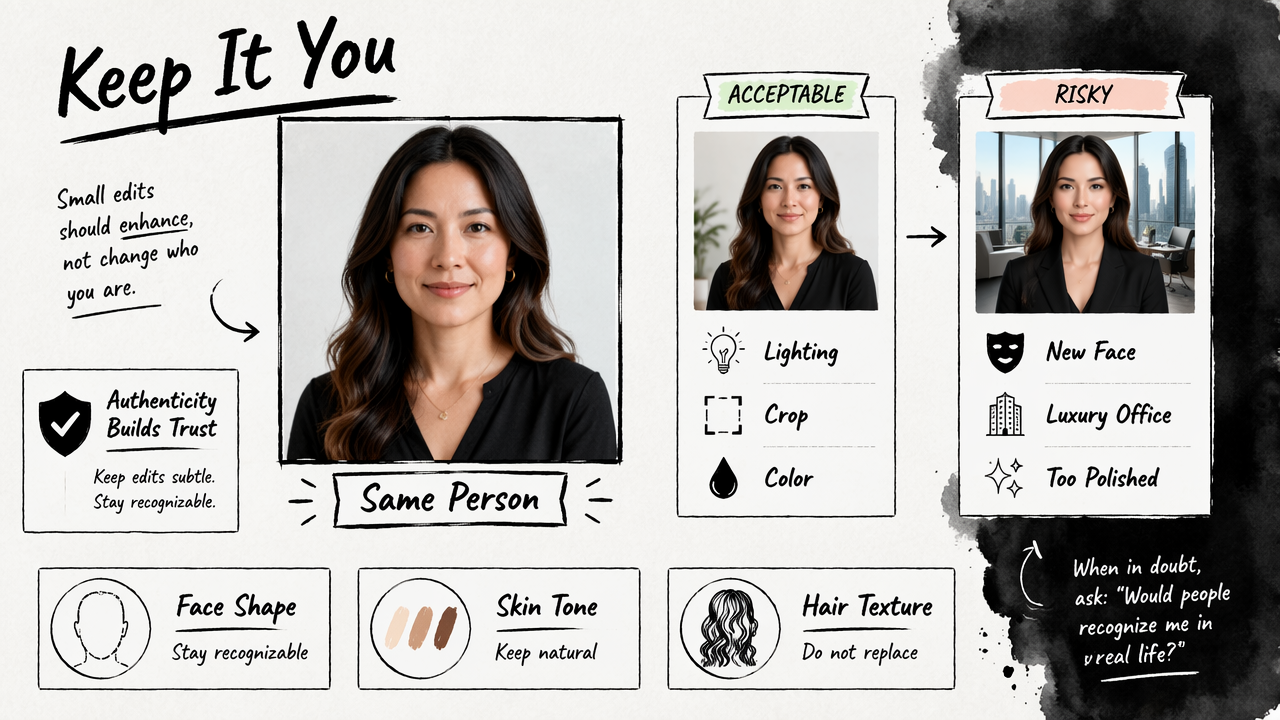
Acceptable changes are usually technical. Better lighting, a cleaner crop, a less distracting background, and subtle color correction make a photo easier to read. The profile owner remains the same person.
Risky changes alter trust. A generated luxury office can imply status that does not exist. A fake uniform can imply credentials. Extreme skin smoothing can remove age, texture, or identity markers. Crothers, Japkowicz, and Viktor reviewed threat models and detection methods for machine-generated text in IEEE Access, and the broader point applies to synthetic media too: detection and trust are now part of digital communication in their 2023 survey.
Use AI to look prepared, not to look like a different person.
A balanced edit should pass three checks:
- Recognition check: colleagues would recognize the person immediately.
- Context check: the outfit and background fit the actual career setting.
- Integrity check: no credential, role, wealth, or lifestyle is implied falsely.
Copyright and ownership questions around AI-generated works remain active in the 2020s, especially as deep learning systems raise questions about the status of generated outputs. For professional photos, the safer practice is to use tools with clear terms, avoid uploading images without permission, and keep copies of original source photos.
FAQs about AI LinkedIn photo generators
What file size and crop work best for LinkedIn photos?
LinkedIn profile images should be clear, square, and easy to read inside a circular crop. A 1:1 image with the face centered and space above the head usually works best. The export should be high enough quality to stay sharp after upload, while avoiding tiny or heavily compressed files.
What background should an AI LinkedIn headshot use?
A neutral background works best for most LinkedIn photos because it keeps attention on the face. Light gray, soft beige, muted office settings, and gentle outdoor blur are safe choices. Bold colors can work for creators, but the background should not distract from facial clarity or professional trust.
What should someone wear in an AI-generated LinkedIn photo?
Clothing should match the person's actual professional setting. Job seekers often do well with business casual attire. Executives may choose a blazer or formal shirt. Creators and freelancers can show more personality, but the outfit should still support credibility rather than look like a costume.
Can AI LinkedIn photos be used outside LinkedIn?
AI headshots can often support wider personal branding when the image remains accurate and polished. The same photo may work for resumes, speaker bios, portfolio pages, newsletters, and client proposals. Entrepreneurs can also align profile imagery with assets such as an AI Facebook ad for a fitness Instagram brand.
Are AI LinkedIn profile photos acceptable in 2026?
AI LinkedIn photos are generally acceptable when they represent the real person honestly. Recruiters, clients, and collaborators mainly need a clear, current, trustworthy image. Problems arise when AI creates a misleading identity, fake setting, unrealistic age change, or altered professional status.
Conclusion
An artificial intelligence photo generator for linkedin photos is most useful when it saves time while protecting credibility. The strongest result looks current, realistic, and aligned with the person's role, not overly processed or theatrical.
For a practical next step, gather three recent source photos, choose one professional style, generate several realistic options, and compare them at thumbnail size. Looktara can support the broader visual system around that headshot, from profile imagery to branded campaign assets. Head to looktara.com when a faster, more polished professional image workflow is needed.
Generated by EarlySEO.com