
TL;DR
A polished Notion profile photo should look clear at small sizes, match the tone of shared workspaces, and stay consistent with LinkedIn, client portals, and newsletters. AI headshots work best when the crop is tight, the expression is approachable, and the background is simple enough for Notion's compact interface.
A Notion profile picture often appears in comments, shared databases, client portals, and team docs before a person says a word. An AI headshot for Notion profile picture can make that small identity marker look polished without booking a studio session. Looktara helps create professional profile images that fit modern work tools, while Notion's own Notion Faces feature offers a more playful avatar style. The best choice depends on whether the workspace needs trust, personality, brand consistency, or a mix of all three.
Table of Contents
What is an AI headshot for Notion profile picture?
An AI headshot for Notion profile picture is a generated or AI-enhanced portrait sized and styled for Notion's account avatar, team workspaces, and shared pages. It usually uses a real person's face, clean lighting, a simple background, and a professional crop so the image remains recognizable in small interface placements.
AI headshot: a computer-generated or AI-edited portrait designed to resemble a professional head-and-shoulders photo.
Notion: a productivity and note-taking application from Notion Labs used for knowledge management, data organization, project tracking, and collaboration, according to the Wikipedia description included in the research data.
Research on artificial intelligence in creative work has treated AI as a tool for image generation, editing, and visual production. A 2021 review by Nantheera Anantrasirichai and David Bull examined AI across creative industries, including how machine learning supports image and media tasks in professional workflows Artificial intelligence in the creative industries: a review.
Key insight: Notion avatars are not decorative only; in shared workspaces, they become trust signals attached to comments, tasks, project pages, and client-facing documents.
Where the image appears inside Notion
A Notion profile photo shows up in account settings, workspace members, mentions, comments, page activity, and shared collaboration spaces. Because those placements are small, facial clarity matters more than dramatic styling.
Strong Notion profile images usually share these traits:
- Centered face: the eyes and mouth remain visible at thumbnail size.
- Simple clothing: solid colors read better than busy patterns.
- Soft background: neutral gray, cream, blue, or warm studio tones work well.
- Natural expression: a slight smile feels professional without looking stiff.
- Consistent identity: the image should match LinkedIn, email, and client portals.
What makes a Notion profile photo look professional?
A Notion profile photo looks professional when the face is easy to recognize, the crop is balanced, and the style matches the workspace's purpose. For freelancers, remote workers, and founders, the safest look is a bright head-and-shoulders portrait with a plain background and a relaxed expression.
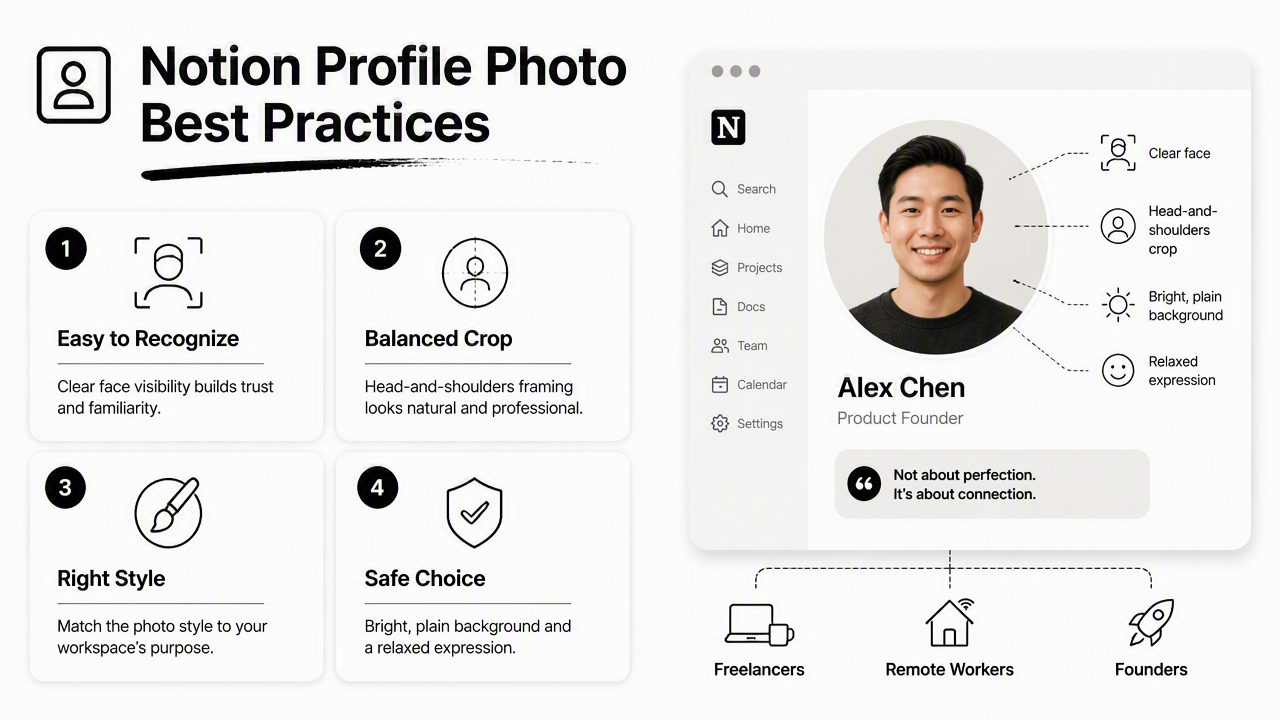
Notion is not a photo-first network like Instagram or Pinterest. Its profile picture works more like a signature beside work. That means the image should feel credible in a project database, sales hub, investor memo, editorial calendar, or shared client dashboard.
A polished image should avoid looking overproduced. Heavy retouching, glossy fashion lighting, or a background that competes with the face can feel out of place in a calm productivity workspace.
Notion profile picture style checklist
Use this checklist before uploading a headshot to Notion:
- Choose a square image: Notion displays avatars in circular crops, so square files reduce surprise cropping.
- Keep the face large: the face should fill roughly 60 to 70 percent of the frame.
- Use even lighting: avoid harsh shadows across the eyes.
- Pick a calm background: solid or lightly textured backgrounds work better than offices with clutter.
- Match the workspace tone: creative teams can use warmer styling, while consulting or finance spaces may need a cleaner look.
- Test at thumbnail size: shrink the image on screen before final upload.
For professionals managing several public channels, profile consistency matters beyond Notion. A creator who also publishes visual content may want a matching approach for a Pinterest profile picture generator, while operators with email-based audiences may prefer a compatible newsletter profile picture generator.
Best crop and background choices
| Element | Best choice for Notion | Why it works |
|---|---|---|
| Crop | Square head-and-shoulders | Survives Notion's circular avatar display |
| Expression | Soft smile or calm neutral look | Signals approachability in comments and docs |
| Background | Plain gray, blue, beige, or off-white | Keeps focus on the face at small sizes |
| Clothing | Solid top or light blazer | Reads clearly without visual noise |
| Angle | Straight-on or slight turn | Feels natural but still recognizable |
The Looktara platform is useful when the same professional image family needs to work across Notion, LinkedIn, websites, resumes, and newsletters. That consistency helps a person feel like the same operator across every channel, rather than a different identity in each tool.
How can a headshot be created and uploaded in Notion?
A Notion-ready headshot can be created by generating a clean portrait, exporting it as a square image, checking the circular crop, and uploading it through Notion account settings. The process is simple, but the final image should be tested in a real page or comment before becoming the default profile photo.
Step-by-step Notion upload workflow
Follow this practical workflow:
- Generate or select the portrait: choose a realistic headshot with clear eyes and natural skin texture.
- Crop to square: use a 1:1 crop with space around the head.
- Preview as a circle: confirm that hair, chin, and shoulders are not awkwardly cut off.
- Compress if needed: keep the file light enough for quick loading.
- Open Notion settings: go to the account profile area.
- Upload the image: replace the existing avatar or blank profile icon.
- Check a shared page: view the avatar beside comments, mentions, or tasks.
Notion's help center explains that Notion Faces can also be created and used as a profile photo, giving users a built-in way to design a Notion-style portrait Create avatars with Notion Faces. That option is useful for teams that want a playful, uniform look.
Quality checks before the image goes live
A quick review prevents the most common profile-photo issues. The face should remain recognizable when reduced to a small circle, and the image should not clash with the workspace's visual tone.
Check these points before final upload:
- The eyes are sharp, not softened by AI smoothing.
- The jawline and hairline look natural.
- The background does not resemble a fake office scene.
- The clothing fits the professional context.
- The same image style can be repeated for a team, brand, or client portal.
For resume-driven personal branding, a Notion headshot can also align with a Shopify resume headshot generator or a newsletter resume headshot generator. The goal is not identical photos everywhere, but a consistent professional signal.
AI headshot vs Notion Faces vs standard avatar
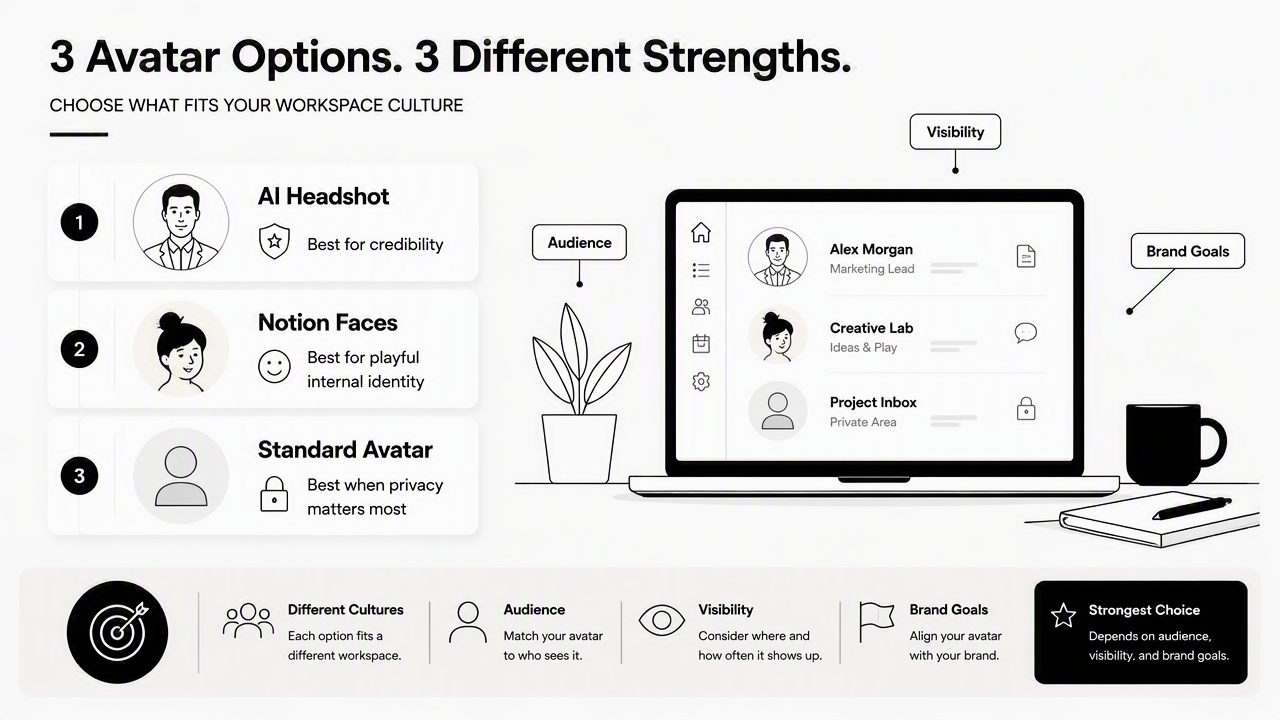
An AI headshot is best for credibility, Notion Faces is best for playful internal identity, and a standard avatar is best when privacy matters more than personal branding. Each option fits a different workspace culture, so the strongest choice depends on audience, visibility, and brand goals.
Profile picture option comparison
| Option | Best for | Strength | Limitation |
|---|---|---|---|
| AI headshot | Freelancers, founders, consultants, remote workers | Looks polished in client-facing spaces | Needs careful realism checks |
| Notion Faces | Internal teams, students, playful workspaces | Native Notion style and easy customization | Less useful for external credibility |
| Standard avatar or initials | Privacy-first users and low-visibility workspaces | Simple and low effort | Does not build personal recognition |
| Traditional photo | People with a strong existing portrait | Real and familiar | May not match current brand or crop needs |
A 2022 ACM paper by Milagros Miceli and Julian Posada studied data production systems behind AI work, a reminder that generated media depends on complex human and technical processes The Data-Production Dispositif. For profile images, that makes review and consent especially important when real faces are involved.
Best practical choice: use an AI headshot for client-facing Notion spaces, Notion Faces for casual internal teams, and initials only when privacy or anonymity is the main goal.
Who should pick which option
Freelancers and consultants usually benefit from a realistic headshot because Notion often doubles as a client portal. A recognizable face can make project updates, feedback threads, and dashboards feel more personal.
Remote teams may prefer a shared visual system. Some members can use clean AI portraits while others use illustrated avatars, but the background colors, crops, and framing should still feel related.
Creators and entrepreneurs should think beyond Notion. If a profile image also appears in public content hubs, a related Pinterest resume headshot generator can help maintain a consistent identity across discovery platforms.
Dating app users have a different goal. A Notion image can be more professional and restrained, while dating profile photos should feel warmer, more candid, and less corporate.
What should teams expect from profile imagery in 2027?
Profile imagery in 2027 will likely become more consistent, portable, and policy-aware across work tools. As AI-generated portraits become normal in professional settings, teams will need clearer rules for realism, disclosure, brand fit, and identity consistency across Notion, Slack, LinkedIn, email, and client portals.
Remote work has already made mediated identity feel ordinary. Hannah Zeavin's 2021 MIT Press book on distance-based communication examined how care and interaction shift when mediated through technology The Distance Cure. Professional profile images are a small but visible part of that shift.
Teams should prepare simple rules instead of debating every avatar. A good policy can cover approved backgrounds, whether AI portraits are allowed, how often images can change, and what counts as too stylized for client-facing spaces.
Simple profile standards for remote teams
A practical Notion profile-photo policy can fit in one page:
- Face visibility: profile photos should be clear at small sizes.
- Tone: images should match the team's client-facing style.
- Background: use a shared color family or neutral palette.
- Update rhythm: refresh portraits after major brand or role changes.
- Consent: no one should generate or edit another person's face without permission.
With Looktara, teams and solo professionals can create image sets that feel consistent without looking cloned. For direct access, visit looktara.com and choose a headshot style that fits the workspace's level of formality.
Frequently asked questions
Is an AI headshot acceptable for a Notion profile picture?
An AI headshot is acceptable for a Notion profile picture when it accurately represents the person and fits the workspace context. Client-facing spaces usually need realistic portraits, while internal team spaces can support more creative styles. The safest image is polished, natural, and easy to recognize.
What size should a Notion profile picture be?
A square image works best because Notion displays profile photos as circular avatars. A high-quality square crop gives enough room around the face and reduces awkward cuts around hair or shoulders. The exact file can vary, but clarity at small thumbnail size matters most.
Is Notion Faces better than an AI headshot?
Notion Faces is better for playful, Notion-native identity, especially inside casual teams. An AI headshot is better for freelancers, founders, and professionals who use Notion with clients or external partners. The choice depends on whether the profile should feel branded, personal, anonymous, or fun.
How often should a Notion profile photo be updated?
A Notion profile photo should be updated after a major appearance change, brand refresh, role change, or shift in audience. For most professionals, an annual review is enough. Consistency matters, so frequent changes can make a workspace feel less stable.
Conclusion
The best AI headshot for Notion profile picture is clear, realistic, square-cropped, and consistent with the person's wider professional identity. Notion Faces remains a strong built-in option for playful teams, but realistic AI portraits better support client trust in shared dashboards and project spaces. The next step is simple: choose a clean portrait style, preview the circular crop, upload it to Notion, and use Looktara when a polished image set needs to match Notion plus other public professional profiles.
Generated by EarlySEO.com